找回密码
 立即注册

QQ登录

只需一步,快速开始

搜索

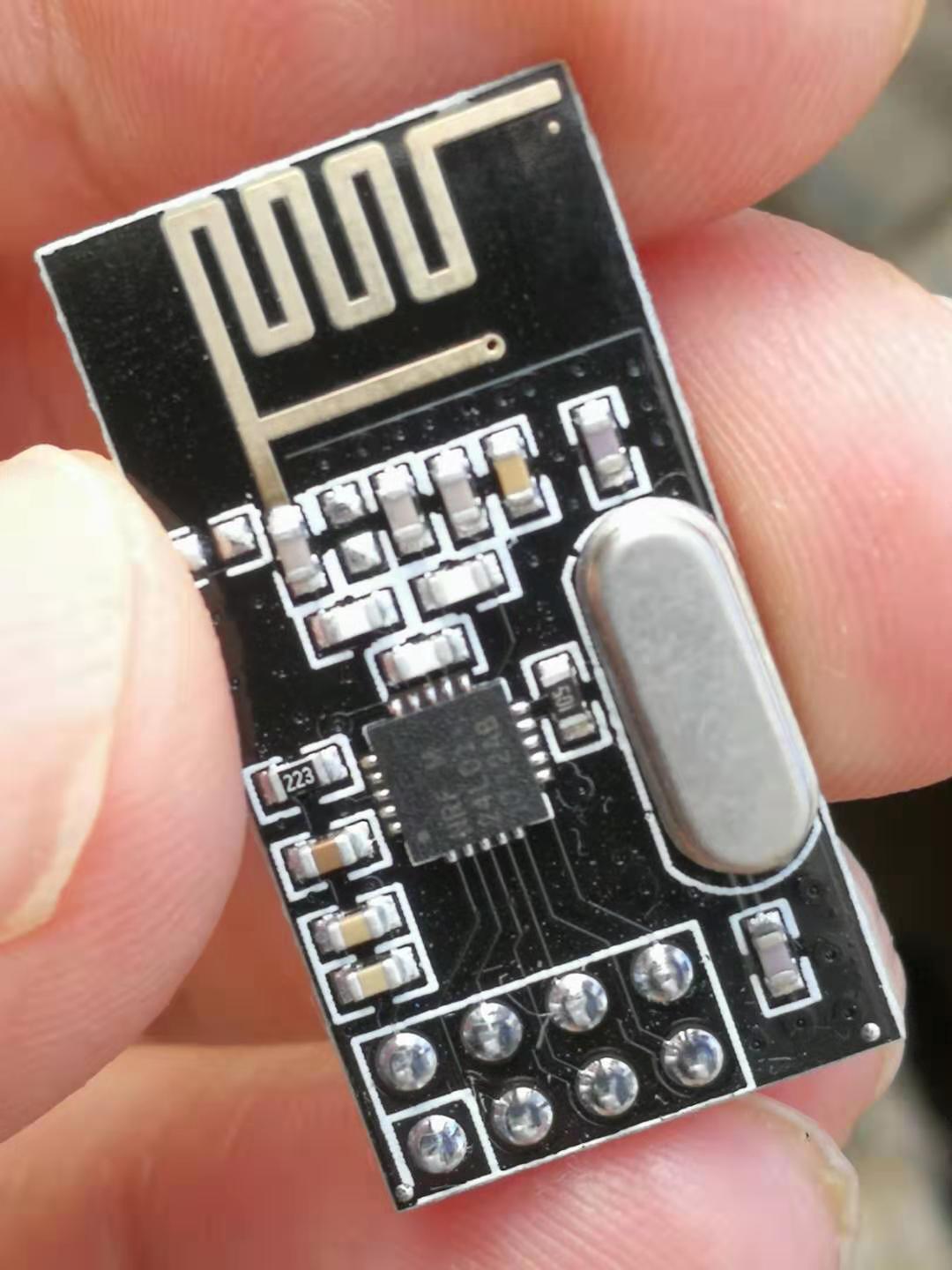
【Arduino】108种传感器模块系列实验(116)--- 24L01无线模块

查看数: 4666 | 评论数: 28 | 收藏 2
关灯 | 提示:支持键盘翻页<-左 右->
    组图打开中,请稍候......
发布时间: 2019-9-18 20:16

正文摘要:

37款传感器与模块的提法,在网络上广泛流传,其实Arduino能够兼容的传感器模块肯定是不止37种的。鉴于本人手头积累了一些传感器和模块,依照实践出真知(一定要动手做)的理念,以学习和交流为目的,这里准备逐一动 ...

回复

ID:513258 发表于 2020-10-24 15:36
zlt_123456 发表于 2020-4-11 15:35
问一下出现Mirf.h: No such file or directory错误是啥意思

没有这样的文件或目录
ID:683442 发表于 2020-4-11 15:35
问一下出现Mirf.h: No such file or directory错误是啥意思
ID:513258 发表于 2019-9-19 14:14
  1. /*
  2. 【Arduino】108种传感器模块系列实验(资料+代码+图形+仿真)
  3. 实验一百一十六:NRF24L01+ 无线模块 功率加强版 2.4G无线收发通信模块 黑金刚
  4. 1、安装“Mirf”库(下载链接 https://github.com/aaronds/arduino-nrf24l01)
  5.      安装“rf24”库(下载链接 https://github.com/nRF24/RF24)
  6. 2、项目测试 :NRF24L01最简单测试之Server示例代码
  7. 3、模块接线
  8. Arduino uno    ---    nRF24L01
  9. 3.3V                 ---    VCC:模块供电引脚
  10. GND                 ---    GND:模块接地引脚
  11. D7                    ---    CSN:接收端选择引脚
  12. D8                    ---    CE:发射/接受状态选择引脚
  13. D11                  ---    MOSI :控制端输出,接收端输入引脚
  14. D13                  ---    SCK:时钟信号
  15. D12                  ---    MISO:控制端输入,接收端输出引脚
  16. *IRQ引脚在本例中不需要接
  17. */

  18. #include <SPI.h>
  19. #include <Mirf.h>
  20. #include <nRF24L01.h>
  21. #include <MirfHardwareSpiDriver.h>

  22. void setup(){
  23.   Serial.begin(9600);
  24.   
  25.   /*
  26.    * Set the SPI Driver.
  27.    */

  28.   Mirf.spi = &MirfHardwareSpi;
  29.   
  30.   /*
  31.    * Setup pins / SPI.
  32.    */
  33.    
  34.   Mirf.init();
  35.   
  36.   /*
  37.    * Configure reciving address.
  38.    */
  39.    
  40.   Mirf.setRADDR((byte *)"serv1");
  41.   
  42.   /*
  43.    * Set the payload length to sizeof(unsigned long) the
  44.    * return type of millis().
  45.    *
  46.    * NB: payload on client and server must be the same.
  47.    */
  48.    
  49.   Mirf.payload = sizeof(unsigned long);
  50.   
  51.   /*
  52.    * Write channel and payload config then power up reciver.
  53.    */
  54.    
  55.   Mirf.config();
  56.   
  57.   Serial.println("Listening...");
  58. }

  59. void loop(){
  60.   /*
  61.    * A buffer to store the data.
  62.    */
  63.    
  64.   byte data[Mirf.payload];
  65.   
  66.   /*
  67.    * If a packet has been recived.
  68.    *
  69.    * isSending also restores listening mode when it
  70.    * transitions from true to false.
  71.    */
  72.    
  73.   if(!Mirf.isSending() && Mirf.dataReady()){
  74.     Serial.println("Got packet");
  75.    
  76.     /*
  77.      * Get load the packet into the buffer.
  78.      */
  79.      
  80.     Mirf.getData(data);
  81.    
  82.     /*
  83.      * Set the send address.
  84.      */
  85.      
  86.      
  87.     Mirf.setTADDR((byte *)"clie1");
  88.    
  89.     /*
  90.      * Send the data back to the client.
  91.      */
  92.      
  93.     Mirf.send(data);
  94.    
  95.     /*
  96.      * Wait untill sending has finished
  97.      *
  98.      * NB: isSending returns the chip to receving after returning true.
  99.      */
  100.       
  101.     Serial.println("Reply sent.");
  102.   }
  103. }
复制代码


ID:513258 发表于 2019-9-19 14:08
  1. /*
  2. 【Arduino】108种传感器模块系列实验(资料+代码+图形+仿真)
  3. 实验一百一十六:NRF24L01+ 无线模块 功率加强版 2.4G无线收发通信模块 黑金刚
  4. 1、安装“Mirf”库(下载链接 https://github.com/aaronds/arduino-nrf24l01)
  5.      安装“rf24”库(下载链接 https://github.com/nRF24/RF24)
  6. 2、项目测试 :NRF24L01最简单测试之Client 示例代码
  7. 3、模块接线
  8. Arduino uno    ---    nRF24L01
  9. 3.3V                 ---    VCC:模块供电引脚
  10. GND                 ---    GND:模块接地引脚
  11. D7                    ---    CSN:接收端选择引脚
  12. D8                    ---    CE:发射/接受状态选择引脚
  13. D11                  ---    MOSI :控制端输出,接收端输入引脚
  14. D13                  ---    SCK:时钟信号
  15. D12                  ---    MISO:控制端输入,接收端输出引脚
  16. *IRQ引脚在本例中不需要接
  17. */

  18. #include <SPI.h>
  19. #include <Mirf.h>
  20. #include <nRF24L01.h>
  21. #include <MirfHardwareSpiDriver.h>

  22. void setup(){
  23.   Serial.begin(9600);
  24.   /*
  25.    * Setup pins / SPI.
  26.    */
  27.    
  28.   /* To change CE / CSN Pins:
  29.    *
  30.    * Mirf.csnPin = 9;
  31.    * Mirf.cePin = 7;
  32.    */
  33.   /*
  34.   Mirf.cePin = 7;
  35.   Mirf.csnPin = 8;
  36.   */
  37.   Mirf.spi = &MirfHardwareSpi;
  38.   Mirf.init();
  39.   
  40.   /*
  41.    * Configure reciving address.
  42.    */
  43.    
  44.   Mirf.setRADDR((byte *)"clie1");
  45.   
  46.   /*
  47.    * Set the payload length to sizeof(unsigned long) the
  48.    * return type of millis().
  49.    *
  50.    * NB: payload on client and server must be the same.
  51.    */
  52.    
  53.   Mirf.payload = sizeof(unsigned long);
  54.   
  55.   /*
  56.    * Write channel and payload config then power up reciver.
  57.    */
  58.    
  59.   /*
  60.    * To change channel:
  61.    *
  62.    * Mirf.channel = 10;
  63.    *
  64.    * NB: Make sure channel is legal in your area.
  65.    */
  66.    
  67.   Mirf.config();
  68.   
  69.   Serial.println("Beginning ... ");
  70. }

  71. void loop(){
  72.   unsigned long time = millis();
  73.   
  74.   Mirf.setTADDR((byte *)"serv1");
  75.   
  76.   Mirf.send((byte *)&time);
  77.   
  78.   while(Mirf.isSending()){
  79.   }
  80.   Serial.println("Finished sending");
  81.   delay(10);
  82.   while(!Mirf.dataReady()){
  83.     //Serial.println("Waiting");
  84.     if ( ( millis() - time ) > 1000 ) {
  85.       Serial.println("Timeout on response from server!");
  86.       return;
  87.     }
  88.   }
  89.   
  90.   Mirf.getData((byte *) &time);
  91.   
  92.   Serial.print("Ping: ");
  93.   Serial.println((millis() - time));
  94.   
  95.   delay(1000);
  96. }
复制代码


小黑屋|51黑电子论坛 |51黑电子论坛6群 QQ 管理员QQ:125739409;技术交流QQ群281945664

Powered by 单片机教程网

快速回复 返回顶部 返回列表